In this post ▾
- Why Instagram doesn't do anonymous messages
- How to get anonymous messages on Instagram in 4 steps
- 1. Get your own link
- 2. Share it to your story
- 3. Put the link in your bio too
- 4. Answer the best ones on your story
- Tips to get more (and better) messages
- Keeping it safe
- Can you find out who sent an anonymous message?
- Frequently asked questions
- Does Instagram have anonymous messages?
- Can I see who sent me an anonymous message?
- Do my friends need an app to send me a message?
- Is MirrorBox free?
Instagram is where your friends already are, but it has no way to send anonymous messages. The question sticker always tells you who asked, so people hold back the honest stuff.
The fix is simple: put an anonymous message link in your story or bio. People tap it, write whatever they want, and it lands in a private inbox that only you can see. This guide walks through the whole thing, from getting a link to answering the best messages on your story.
NOTE
Quick Answer: To get anonymous messages on Instagram, create a free link using an anonymous messaging service like MirrorBox, select Share link to your story to generate a prompt card, and attach the link sticker to your Instagram Story. Friends can send questions, songs, or vibe checks directly through their browser without downloading an app or making an account, and replies land in your private inbox.
TIP
Short on time? Get your free link, tap Share link to your story, and come back to this guide later for the tricks that get more replies.
Why Instagram doesn't do anonymous messages#
Instagram's DMs and the question sticker are tied to accounts, on purpose. Knowing who sent what makes it easier for Instagram to deal with spam and abuse. The downside is that you mostly get polite, safe answers.
With over 500 million daily active users sharing Instagram Stories, stories are the most interactive surface on social media. Yet because native question stickers attach the sender's handle, social communication surveys indicate that over 65% of followers hold back genuine questions or candid feedback due to social pressure.
Anonymous messages work differently. Because nobody knows who sent what, people are more willing to:
- tell you what they actually think of your new haircut,
- confess the crush they've had since year 9,
- ask the question they'd never ask in DMs,
- or share a song that reminds them of you.
That's the whole appeal, and it's why "send me anonymous messages" links show up on so many stories.
How to get anonymous messages on Instagram in 4 steps#
1. Get your own link#
Create a free MirrorBox page and pick a handle. Your link looks like mirrorbox.me/yourname. You can choose which kinds of messages people can send: anonymous notes, questions, songs, "describe me in 3 words" cards, memories and vibe checks.
2. Share it to your story#
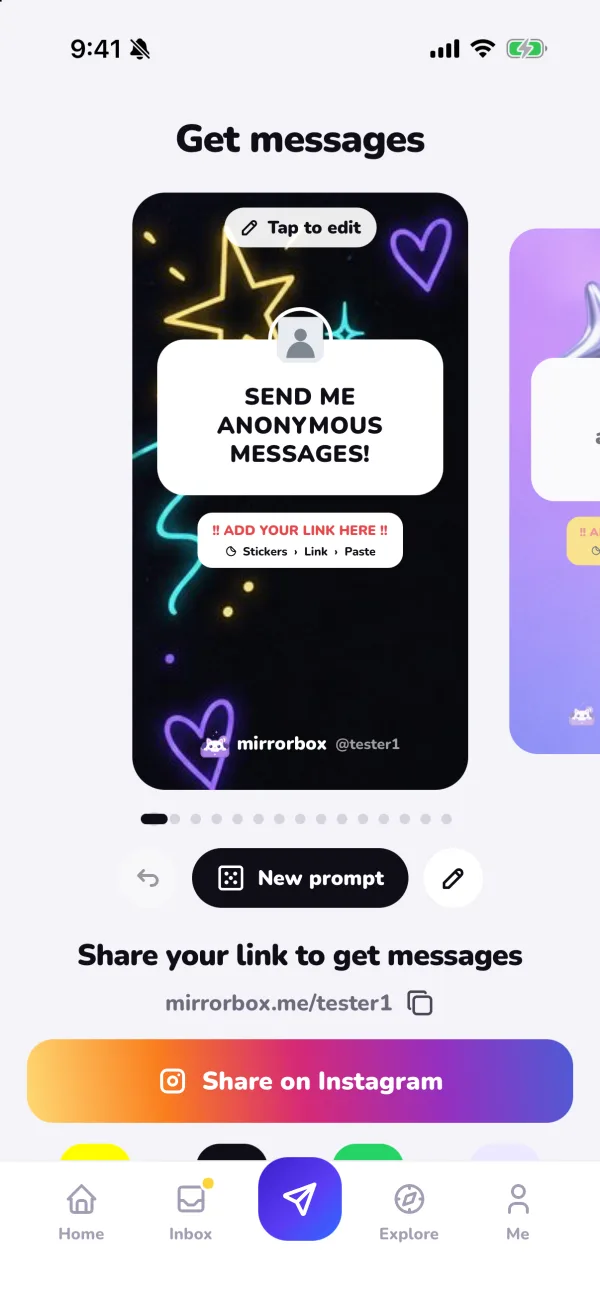
On the MirrorBox home screen, tap Share link to your story. Pick a story design you like (tap New prompt for a different question, or Tap to edit to write your own), then tap Share on Instagram.
Instagram opens with the image ready. Add your link where it says Add your link here: Stickers → Link → Paste, and post.
3. Put the link in your bio too#
Stories disappear after 24 hours; your bio doesn't. Go to Edit profile → Links → Add external link and paste your MirrorBox link. Now new followers can send you a message any time.
4. Answer the best ones on your story#
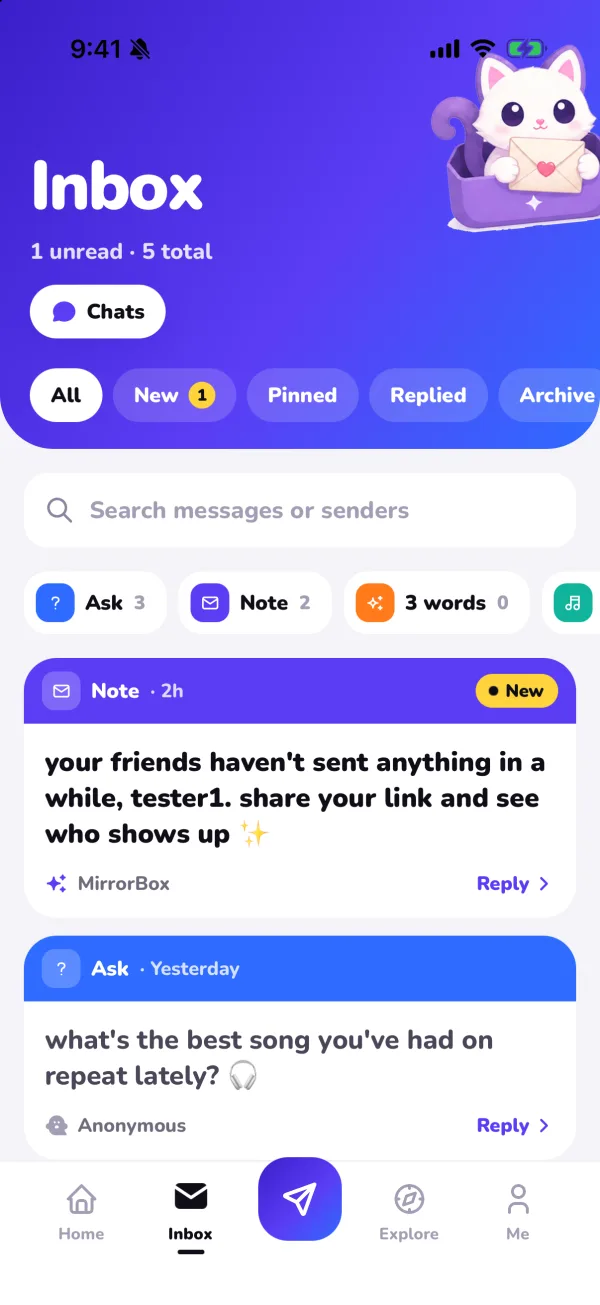
Every message lands in your private inbox first. Nothing goes public unless you choose it. You can filter by new, pinned and replied messages, or by type (questions, notes, songs, 3-word cards).
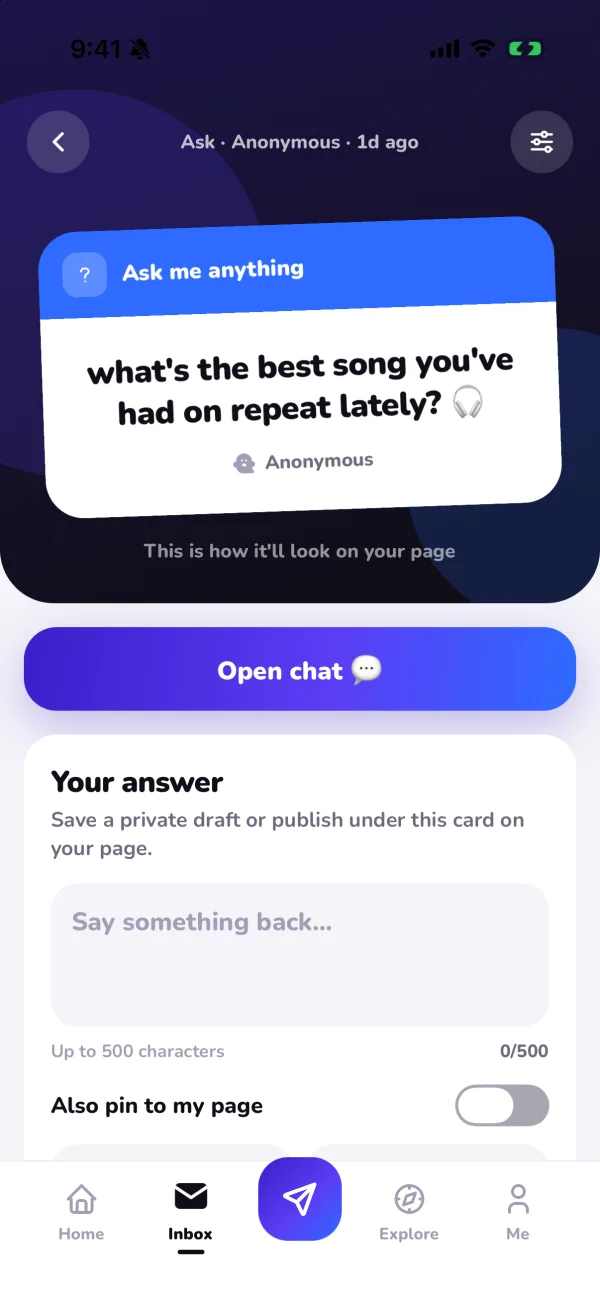
Open a message and you have a few options:
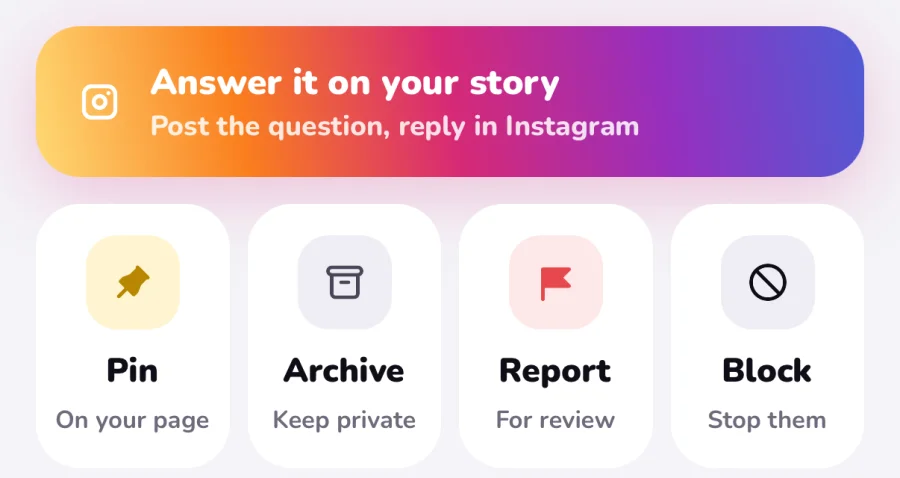
- Answer it on your story posts the question to Instagram so you can reply there.
- Your answer lets you write a reply, keep it as a private draft, or publish it under the card on your page.
- Pin puts the message on your public page; Archive keeps it private.
Tips to get more (and better) messages#
The difference between three messages and thirty is usually the prompt. A few things that work:
| Instead of… | Try… | Why it works |
|---|---|---|
| "send me anything" | "rate my 2026 so far /10 👀" | A specific question is easier to answer |
| One story, once | Repost the link with a new prompt every few days | New prompts bring back people who already sent one |
| A plain text story | Your answer to a message, with the link sticker | People see it's real and want in |
| Only questions | Turn on songs and 3-word cards | Some people would rather send a song than write |
A few more:
- Answer fast. Replying the same day keeps people sending.
- Pin the funny ones. Your public page becomes a highlight reel that makes visitors want to add their own.
- Ask for a specific type. "Describe me in 3 words" gets far more replies than an open box, and the words build a portrait of how your friends see you.
Keeping it safe#
Anonymous should never mean anything goes. Before you post your link, check that the app you use has real controls. On MirrorBox:
- spam and hate filters are on by default,
- you can block, report or mute a sender in one tap, even an anonymous one,
- you can add muted words so certain messages never reach you,
- you can pause your inbox whenever you need a break,
- messages stay private unless you make them public.
WARNING
If a message makes you feel unsafe, don't reply to it. Block and report the sender, and talk to someone you trust. If you think someone is in immediate danger, contact local emergency services.
You can read the full rules in our community guidelines.
Can you find out who sent an anonymous message?#
No, and that's the point. Apps that promise to "reveal" senders for a fee are a common trick: they usually show vague hints that could fit anyone. On MirrorBox, if you start a chat from a message, the sender can choose to reveal who they are. It's always their call, never something you can buy.
Frequently asked questions#
Does Instagram have anonymous messages?#
No. Instagram's native question sticker always displays who asked to the account holder. To receive truly anonymous messages, create a link with a tool like MirrorBox, share it in your story or bio, and followers can message you without logging in or downloading an app.
Can I see who sent me an anonymous message?#
No. On MirrorBox, anonymous senders stay strictly anonymous. Services claiming they can "reveal" sender names for a fee are scams that provide random or fabricated hints. If you initiate a chat from an incoming message in MirrorBox, the sender can voluntarily choose to reveal their identity, but it is always their choice.
Do my friends need an app to send me a message?#
No. Anyone can open your MirrorBox link in their mobile or desktop browser and send notes, questions, or songs immediately without downloading an app or registering an account (unless you set your inbox to require sign-in).
Is MirrorBox free?#
Yes. Creating your link, receiving notes, and sharing replies to your story are 100% free. MirrorBox+ is an optional upgrade offering extended word portraits, custom page themes, and premium wall stickers.
Ready to see what your friends really think? Get your free MirrorBox link and post it to your story today.
The MirrorBox team
Product & Safety EditorialWritten and verified by the MirrorBox team to provide honest, practical guidance on bio links, social sharing, and online privacy.
Enjoyed this post?
Leave a like and share it with a friend.